Showing posts with label Social Studies. Show all posts

Friday, March 4, 2016

What if the Founding Fathers had Facebook?


It’s Founderbook time again! During this unit, our 5th grade students use a Google Site to take on the persona of one of the founding fathers, create a facebook-like profile, and then blog from the perspective of the founder. This time I’ve got a new Google Site template with improvements based on what we learned last year.


This year my fifth grade teachers added to the instructions page. The instructions page offers a nice reference while students are working independently. One addition that I liked a lot was the “Speak like a Founding Father” section. The kids really enjoyed using these tips to get into character.
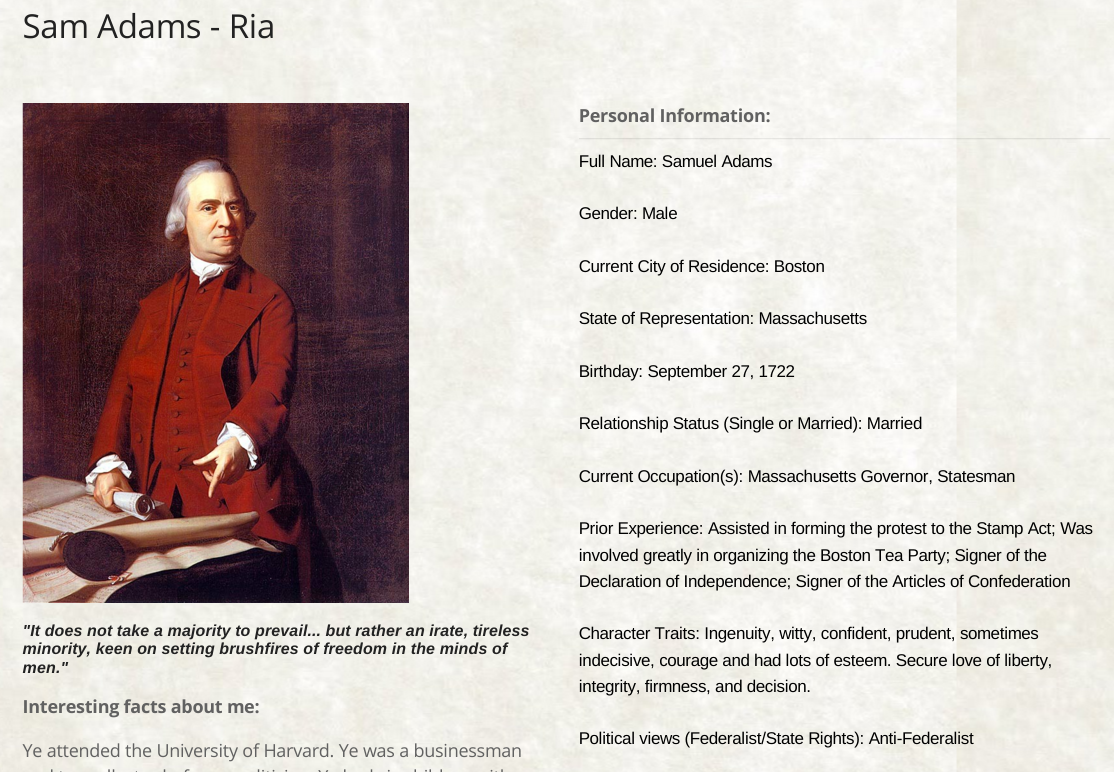


Adding information to the Founderbook page is just the beginning.  The real fun comes when the children use the announcement pages to blog in the first person about their founding father’s experience at the Constitutional Convention. At the end of the unit, students come to school dressed in period clothes, read each other’s posts, and leave comments on their friends blogs, all while staying in character.


Next year I’d like to take better advantage of this anachronistic Colonial Day. The students do a great job dressing as their founder and I’d like to leverage that more effectively. How great would it be if the students used Google Hangouts to stage and record Constitutional Convention debates?


All in all, this continues to be a great unit. Students really get into researching their founder and writing from a historical perspective. Let me know if you use our template or if you have questions in the comments.

Saturday, January 16, 2016

Google Drawings and the First Thanksgiving


f6ad3dbd4633280cfd0c71f002964817.jpg


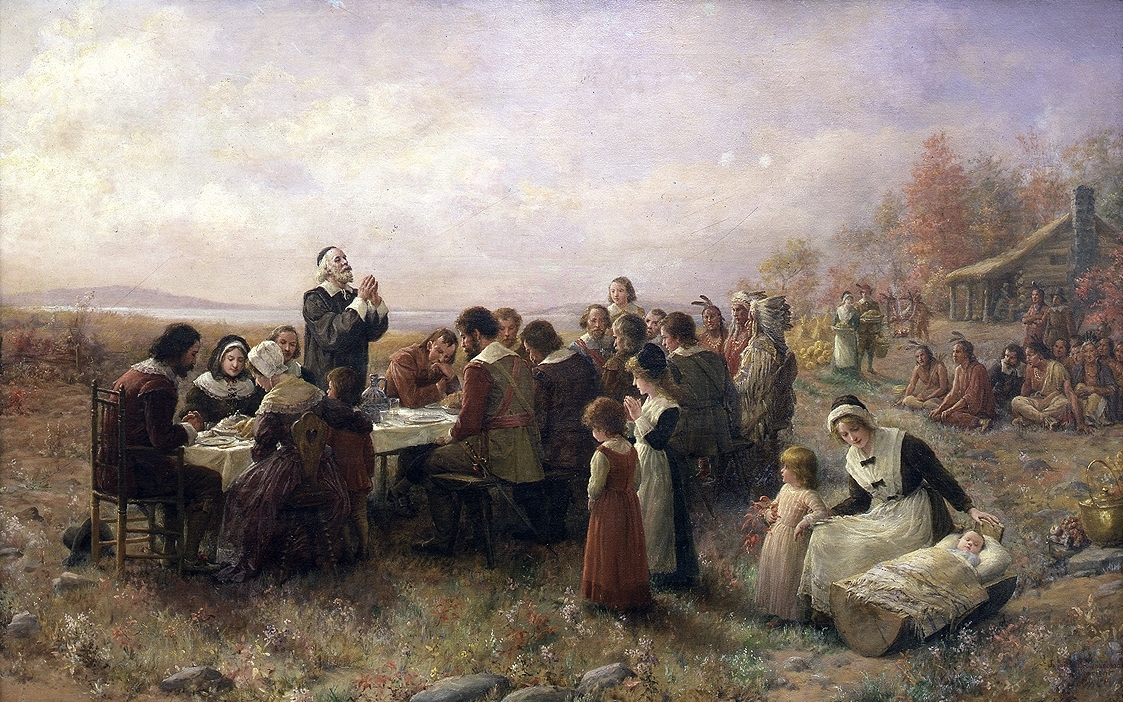
Back in November my fourth grade was studying early america and integrated the unit with the first Thanksgiving. Students in Mrs. Wolfson’s class learned about the lifestyles of the Wampanoag Native Americans and the Pilgrim settlers from the Scholastic First Thanksgiving site and took notes using this graphic organizer. Students then conducted an analysis of the painting “The First Thanksgiving 1621” painted by J.L.G. Ferris. This included zooming into the painting to find relevant details and make inferences.


Finally, the class deconstructed the painting to make a comic strip of the historic event. Students were taught to create vignettes of the painting in Google Drawing. Using their research, students wrote dialog from the different perspectives in the painting.


Google Drawings became the perfect format for this activity. Including research, the activity took three days. Student cartoons were saved as jpgs and added to the class Google presentation below.


Changing Gears
I started the project in Pixton. I was looking for a Comic Life alternative to use with our aging 4th grade chromebooks. It didn’t work out so well. Perhaps I could have structure the activity better, but students obsessed over customizing the characters and building their scenes. Nothing quite fit their research despite many distracting choices and the student emphasis was wrong. To make matters worse, the interface was complicated and didn’t work smoothly.  Older students with more powerful laptops might have a better time.


It went so poorly, in fact, that we changed direction mid-lesson. We scrapped Pixton and spontaneously created and shared a Google Drawing that featured the painting they had been studying. It wasn’t fancy, but it was effective and efficient. The tool “got out of the way” and let students focus on their storytelling.


What I’d Like to Try Next Time


There is some controversy about the authenticity of J.L.G. Ferris’ painting “The First Thanksgiving 1621.” I think it would be interesting to discuss whether this depiction is accurate with our kids. This article from http://historyofmassachusetts.org/ could provide an interesting counterpoint to the Scholastic website, although I think it should be tweaked to be more accessible.  It might also be useful to compare the Farris account with the “First Thanksgiving at Plymouth” by Jennie A. Brownscombe.


Google Drawings saved this project. The deceptively simple interface allowed me to concentrate on the “what” and the “why” instead of the how. I’m looking forward to revisiting the First Thanksgiving next year.

Monday, December 16, 2013

The Google Site FounderBook

My fifth grade classes are studying the Founders and the Constitutional Convention.  There are lots of fun ways to redefine the traditional essay project with this rich subject matter. I really appreciate the work that many have done using social media parodies, like these examples of Historical Fakebook projects.  I wanted to leverage these ideas, too, but using Google Apps - Sites in particular.  

I wanted to build a Google Site that capitalized on the efforts of the class by building social interaction into the project.  What's the point of building a FounderBook page if the founder can't interact with his contemporaries?  

So, this is my first attempt.  It's a good start, but I'm sure I've missed an opportunity or two. This template allows students to build a profile for a Founder, blog from his perspective, and perhaps leave comments on the pages of the other founders. Announcement pages and page templates make Sites well suited for this task.  I built two convention pages to accommodate a class of twenty-plus students.  There is a founder template page ready if you need to add personalities to the list.  The respective convention home pages feature announcement gadgets to display the running blogs for each founder.  

If you're interested in using the template with your class, simply follow the directions below:

1. Create your site by clicking “Use this Template” on the top of the template linked here: https://sites.google.com/site/usfounderbook/


2. Edit the Homepage of your FounderBook by clicking the pencil icon on the top right.


3. Assign Founders to the students in your class by replacing the placeholder names in “Convention 1” and “Convention 2”


4. Click the blue “Share” button and give the students in your class edit access to the site. 


5. This site will now appear on the Students' Sites pages, located at http://sites.google.com. You can also copy and paste the site address into a Google Doc that is shared with your class.

6. The "Instructions Page" assumes that your class has already done research on their Founders and gives a step by step guide to complete the project.

I have several classes using the template and it's going well so far.  Let me know if you improve on the template and/or try it out!